Step 7: Payments
Payment methods (N/A)
Cancellation Policy

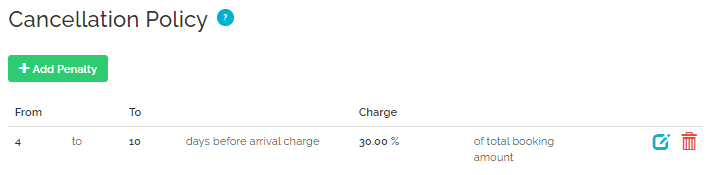
Cancellation Policy (CP) describes the charges applied if a reservation is cancelled within a specific period of time.
Property settings
Airbnb uses specific, pre-defined cancellation policy. Refer to the table below to see how your settings translate to Airbnb cancellation policies.
|
Airbnb CP name |
Airbnb API name |
Rentals United "days from" |
Rentals United "days to" |
Rentals United "charge" |
|---|---|---|---|---|
|
Flexible |
flexible |
0 |
0 |
30% |
|
Moderate |
moderate |
0 |
4 |
75% |
|
Firm |
better_strict_with_grace_period |
0 |
7 |
100% |
|
8 |
30 |
50% |
||
|
Strict |
strict_14_with_grace_period |
0 |
6 |
100% |
|
7 |
13 |
50% |
||
|
Super Strict 30 Days |
super_strict_30 |
0 |
30 |
100% |
|
31 |
999 |
50% |
||
|
Super Strict 60 Days |
super_strict_60 |
0 |
60 |
100% |
|
61 |
999 |
50% |
||
|
Limited |
firm_14 |
0 |
7 |
100% |
|
8 |
14 |
50% |
||
|
Non-refundable |
Available to set up in Channel Settings, see here. |
|||
If your settings do not match the values from the table, our system automatically selects the Airbnb policy that most closely matches your settings. The system analyzes your cancellation fees and timeframes to find the best fit. The cancellation fee in Airbnb can't be lower than the fee in your settings in Rentals United for each day.
Example: Matching cancellation policies
You have the following cancellation policy settings in Rentals United:
-
a 100% cancellation fee for any cancellation made from 13 to 0 days before the check-in,
-
and a 0% for cancellations made earlier.
Flexible and Moderate are disqualified because they offer guests a refund (charging less than 100%) on the day of arrival. Firm is also disqualified because it offers a refund by charging only 50% on the 8th day before arrival.
Only Super Strict 30 and Super Strict 60 both meet the requirement because they charge 100% for cancellations made 13 days before arrival.
To choose between them, we calculate the variance. Since Super Strict 30 remains closer to your 0% fee for the period between 31 and 60 days before arrival. Consequently, the system selects Super Strict 30 as the best match.
|
|
Channel Settings
All Airbnb cancellation policies are listed in the Channel Settings tab. You can choose your one cancellation policy option that will be applied for all your account. Choose your cancellation policy from the list:
| ID | Name | Description |
|---|---|---|
| 0 | Property specific | Considers the policy set at the property level and checks it against available system options. |
| 1 | Flexible | Guests can cancel at least 24 hours before check-in for a full refund. If canceling after check-in, host will receive 100% for each night the guest stays, plus one additional night. |
| 2 | Moderate | Guests can cancel at least five days before check-in for a full refund. If canceling after that, host will receive 100% for each night the guest stays, plus one additional night, and 50% for all unspent nights. |
| 3 | Strict | Guests can cancel within 48 hours of booking and at least 14 days before check-in for a full refund. If canceling more than 14 days before check-in but not within 48 hours of booking, host will receive 50% for all nights. If canceling between seven and 14 days before check-in, host will receive 50% for all nights. After that, host will receive 100% for all nights. Only applicable to selected listings. |
| 4 | Super Strict 30 Days | Guests can cancel at least 30 days before check-in for a 50% refund. After that, host will receive 100% for all nights. |
| 5 | Super Strict 60 Days | Guests can cancel at least 60 days before check-in for a 50% refund. After that, host will receive 100% for all nights. |
| 6 | Firm | Guests can cancel at least 30 days before check-in for a full refund. If canceling between seven and 30 days before check-in, host will receive 50% for all nights. If cancelled less than seven days before check-in, host will receive 100% for all nights. If booked fewer than 30 days before check-in, guests can cancel within 48 hours of booking and at least 14 days before check-in for a full refund. |
| 7 | Limited | Guests who cancel 7-14 days before check-in get 50% back. After that, their trip is non-refundable. Only applicable to selected countries. * |
| 8 | Flexible (IT) | Guests can cancel at least 24 hours before check-in for a full refund. If canceling within 24 hours of check-in and by 12PM local time, host will receive 100% for the first night. Guest will receive full refund for remaining nights. If canceling after check-in, before 12PM local time, guest will receive full refund for unspent nights, excluding fees. If canceling after check-in, after 12PM local time, guest will receive full refund for unspent nights, excluding that night and fees. |
| 9 | Moderate (IT) | Guests can cancel at least seven days before check-in for a full refund. If canceling within seven days before check-in and by 12PM local time, host will receive 50% accommodation cost. If canceling after check-in, before 12PM local time, host will receive 50% for each unspent night. If canceling after checking, after 12PM local time, host will receive 50% for each unspent night, including that night. |
| 10 | Strict (IT) | Guests can cancel at least 30 days before check-in for a full refund. If canceling within 30 days before check-in and by 12PM local time, host will receive 50% accommodation cost. If canceling after check-in, before 12PM local time, host will receive 50% for each unspent night. If canceling after check-in, after 12PM local time, host will receive 50% for each unspent night, including that night. |
| 11 | Super Strict 30 Days (IT) | Guests can cancel at least 30 days before check-in for a full refund. If canceling within 30 days before check-in and by 12PM local time, host receives 100% of accommodation cost excluding fees. |
| 12 | Super Strict 60 Days (IT) | Guests can cancel at least 60 days before check-in for a full refund. If canceling within 60 days before check-in and by 12PM local time, host receives 100% of accommodation cost excluding fees. |
Refer to this Airbnb Help Centre article for details about the cancellation policies and applied fees. The cancellation policy terms differ depending on the length of stay or the property's location. In any case, if cancellation policies are selected by property managers who are not eligible, you will see 'Invalid cancellation policy' error in the Property Settings.
* Limited option is allowed in the listed countries:
-
Canada
-
Argentina
-
Netherlands
-
Sweden
-
Poland
-
Turkey
-
Philippines
-
Morocco
-
South Africa
-
Chile
-
Colombia
Starting from March 23rd 2019, Airbnb requires business hosts to go through verification before they can use a Super Strict Cancellation Policy. In the following cases:
-
If the client is a business host and switches to a Super Strict Cancellation Policy,
-
If the client adds a property with Super Strict Cancellation Policy and is not verified,
, then their properties will display errors in Rentals United prompting them to get verified.
-
In Rentals United platform, go to the Services tab.
-
Switch tab to My services.
-
Type Airbnb in the search box or scroll down through the list of available channels.
-
Unfold the channel section. Click the Down arrow button in the channel box.
-
Click Property Settings.

-
Switch the tab to Channel Settings.

-
A list of available custom policies opens.
-
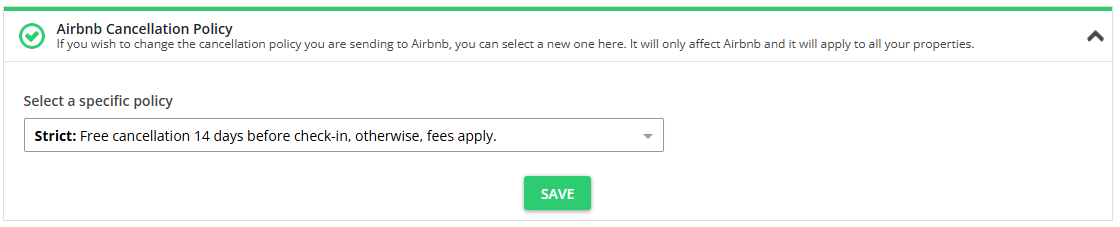
Unfold the Cancellation Policy section. Select one of the cancellation policies available in the dropdown list.
-
Click the Save button.
